REALTRAC EDI

Automate Your Purchase Orders. Accelerate Your Shop Floor.

Realtrac EDI automates the process of receiving customer purchase orders and turning them into estimates or jobs in Realtrac—reducing manual data entry, saving time, and improving accuracy.

Still Turning Purchase Orders Into Jobs by Hand?

For many manufacturers, a new customer order means opening an email, downloading a PDF, finding the customer, finding the part, checking the BOM, finding a previous router, and manually entering the PO details into the ERP. That's a lot of repetitive work—and every manual entry creates another opportunity for error. Realtrac EDI automates much of this process. The original workflow described in the documentation involves all of these manual steps.

With traditional order processing, your team may have to:

Save Time And Money With Automation

Less Data Entry. More Production. From Hours of Work, to Minutes.

One Realtrac customer used the EDI system to transform the process of launching 10 new jobs.
The process went from taking multiple hours to 10 minutes, and the automated process produced more accurate data than manual transcription.

Save Time

Automate the repetitive work involved in turning customer purchase orders into Realtrac jobs and estimates.

Improve Accuracy

Reduce the risk of errors caused by manually transcribing quantities, pricing, contacts and other PO information.

Get Jobs Moving Faster

Incoming orders can be available in the EDI Workbench within approximately 30 seconds, with the resulting estimate or job created within approximately 10 seconds after confirmation and import.

Keep Your Team Focused

Spend less time processing paperwork and more time making and shipping parts.

HOW IT WORKS

From Customer Purchase Order to
Production-Ready Job

01

The Customer Submits a PO

Your customer accesses their secure, private Buyer Portal and uploads their purchase order.

02

Realtrac Receives the Order

Realtrac EDI analyzes the incoming purchase order and maps the information to Realtrac data. The system currently supports:

03

Review in the EDI Workbench

Your team sees the incoming order in the Realtrac EDI Workbench and can review the information before importing it. Users can edit details such as quantity, unit price and part information.

04

Approve and Import

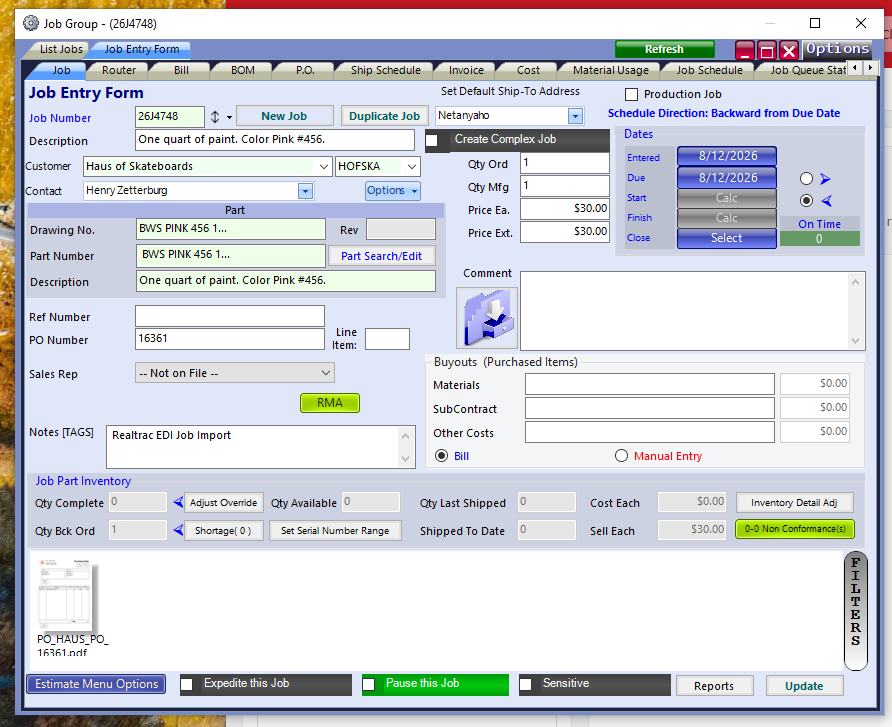
Once reviewed, the purchase order can be imported into Realtrac.The system can be configured to create either:

05

Realtrac Builds the Job

If the part has previously been manufactured, Realtrac can locate the most recent BOM and router information and incorporate them into the new job or estimate.

One System. Two Portals.

Buyer Portal

Give each customer their own secure portal where they can submit purchase orders directly to your shop. Each buyer receives a unique URL for their private Buyer Portal.

Realtrac User Portal

Your team uses the Realtrac User Portal to manage buyers and configure access. Incoming orders are then processed through the EDI Workbench, where your team can review, edit, approve or deny orders before they become estimates or jobs.

Built for Secure Order Processing

Customer purchase orders are submitted through a secure, encrypted website and transmitted through the Realtrac EDI service. Each company's data is stored separately and secured.

Your Customers Don't Have to Change Everything

Not every customer will want to change their ordering process. That's okay. If a buyer prefers to email their purchase orders, your team can upload those purchase orders into the Buyer Portal on their behalf and still take advantage of the automated EDI workflow.

Keep Your Customers Comfortable. Keep Your Shop Automated.

Flexible Order Processing

Realtrac EDI can accommodate different manufacturing workflows.

Existing Parts

When a previously manufactured part is identified, Realtrac can use the most recent BOM and router information.

New Parts

If the part has never been manufactured before, the user can choose to create a new part. The resulting estimate or job will not automatically include a BOM or router.

Review Before You Commit

Your team remains in control. Incoming POs can be reviewed, edited and approved before a job or estimate is created.

Frequently Asked Questions

What is Realtrac EDI?

Realtrac EDI is an automated order-processing service that allows customer purchase orders to be submitted electronically, reviewed by your team and converted into Realtrac estimates or jobs.

Realtrac EDI currently supports PDF, Microsoft Excel (.xlsx) and EDI X12 purchase orders.

The EDI service includes access to the Realtrac User Portal and uses the Realtrac EDI Workbench to process incoming orders. The service carries an additional fee.

No. If a customer continues emailing POs, your team can upload those purchase orders into the Buyer Portal on their behalf.

Uploaded POs should appear in the EDI Workbench within approximately 30 seconds. After confirmation and import, the estimate or job should be created within approximately 10 seconds.

Realtrac identifies that the part has not been manufactured previously and gives the Realtrac user the option to create a new part.

Buyers can currently submit up to 10 PO files at one time. There is no overall limit on the volume of purchase orders buyers can submit.

Stop Spending Hours Turning POs Into Jobs.

See how Realtrac EDI can automate your order-entry process, reduce manual data entry and get customer orders moving faster.